Don’t just memorize.
Say it out loud.

HiWord turns the English you actually meet today into reading, shadowing and conversation practice. Ten minutes a day: from “I know it” to “I can use it.”

Start free · Optional Pro · iOS / Web / Chrome

Android browser version — start here. Open HiWord in Chrome or your system browser for the full learning path, then add it to your home screen. Open Web App
10 minone small loop a day
5 activitieslearn, practice, read, shadow, talk
Everydaycontent becomes practice
Today’s English

Menus, emails, podcasts and meetings can become today’s practice material.

“reservation” is not just for recognition. Say it today. Shadow · AI Talk
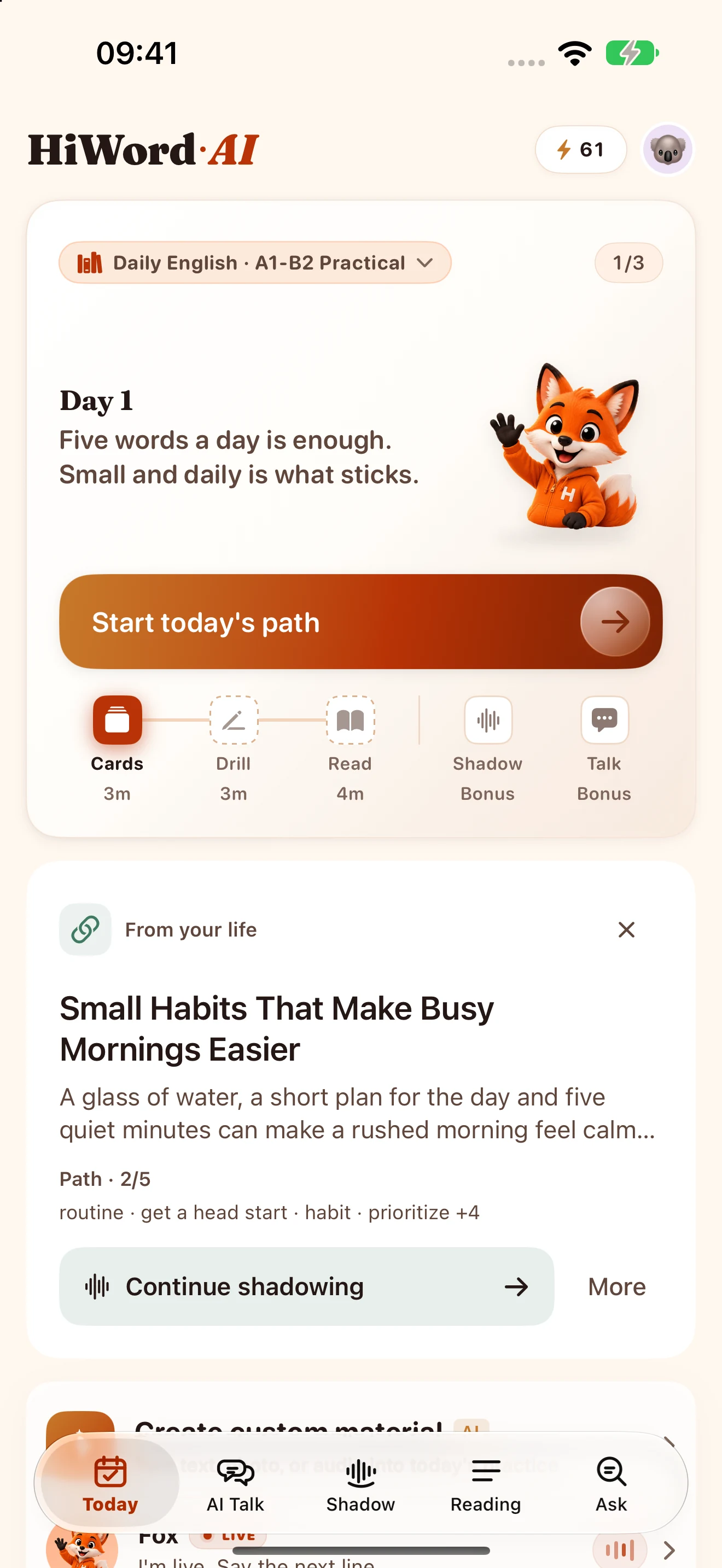
HiWord Today: daily learning path and your own English materials
Extension · Phone · Watch

The English you’re learning, always within reach

Run into a word or a phrase in an email or an article on your computer? Save it with the Chrome extension. Sign in once: it’s waiting on your phone, and a glance away on your wrist.

On your computer · Chrome extension

Read it, save it

Reading an email, a news story or an article? Double-click a word or select a sentence for the meaning and translation, then save it in one tap. No window switching, no lost train of thought.
On your phone · iOS app

Keep learning what you saved

Sign in with the same account and your saved words and sentences join today’s review: flip cards, shadow them, use them in AI Talk.

On your wrist · Apple Watch

Spare seconds, one more look

Waiting for the elevator or standing in line? Flip a few cards from your wrist. Words you just saved come first.

Sign in with the same account to sync supported progress and saved words across Chrome, the web and iOS. View content synced to your Apple Watch.

Free · works in Chrome, Edge and Brave

Extensions install on a computer: open hiword.ai in your desktop browser to find it.

01

Real input becomes practice.

The tweet, the email, the menu, the meeting — the English you actually met today becomes material you can read, shadow and talk through.

02

Friendly feedback, still useful.

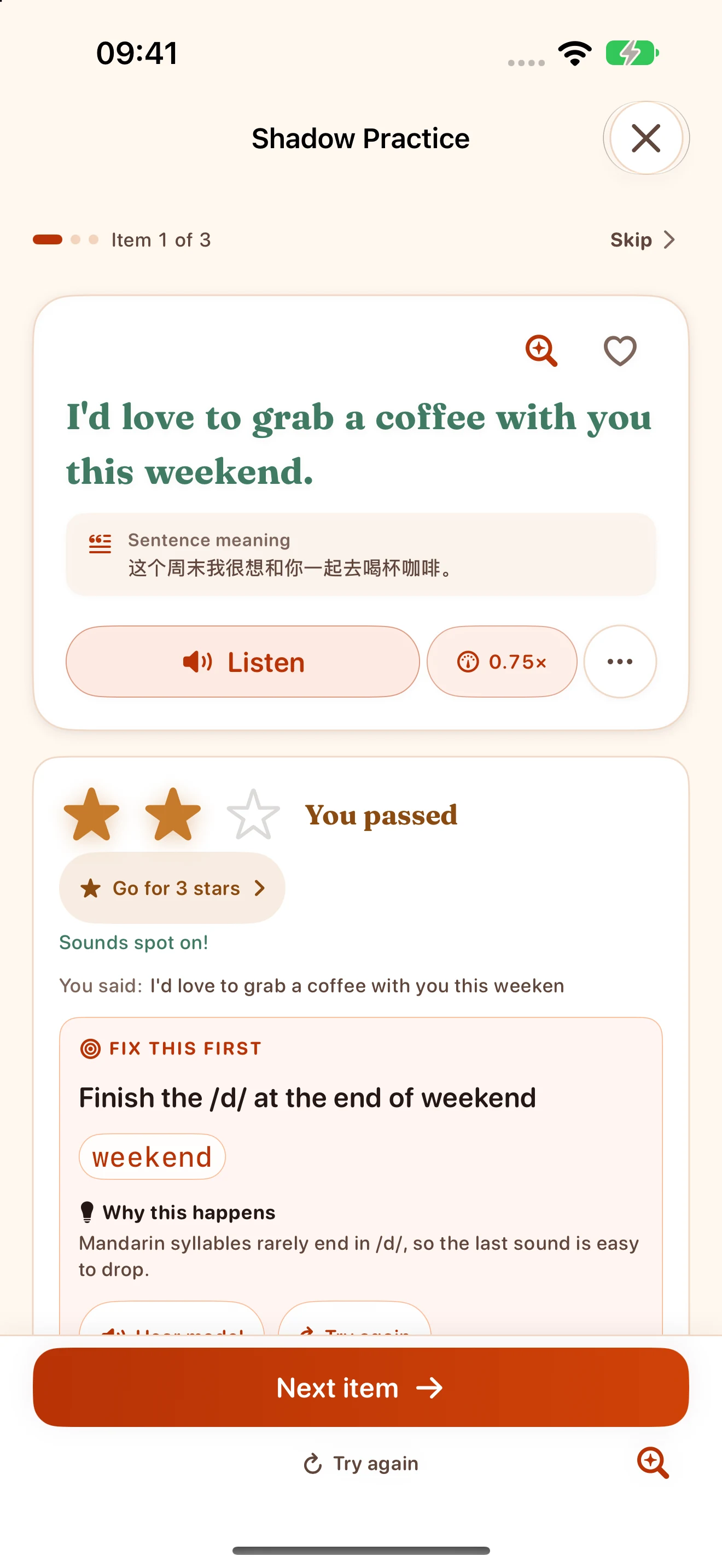
Speaking practice now uses star ratings. If your voice is not detected clearly, HiWord asks for a neutral retry instead of calling it bad pronunciation.

03

One set of words, all the way to conversation.

Learn, practice, read, shadow, AI Talk — today’s target words are visible, marked when used, and key recap phrases can go back into your deck.

From words to expression, at your pace

From “I know it” to “I just said it”

Pick five words today. They show up in cards, questions, an article, a shadow line and an AI conversation. Not another memorization pass — another real use.

Learn

Five daily words on a memory curve

Practice

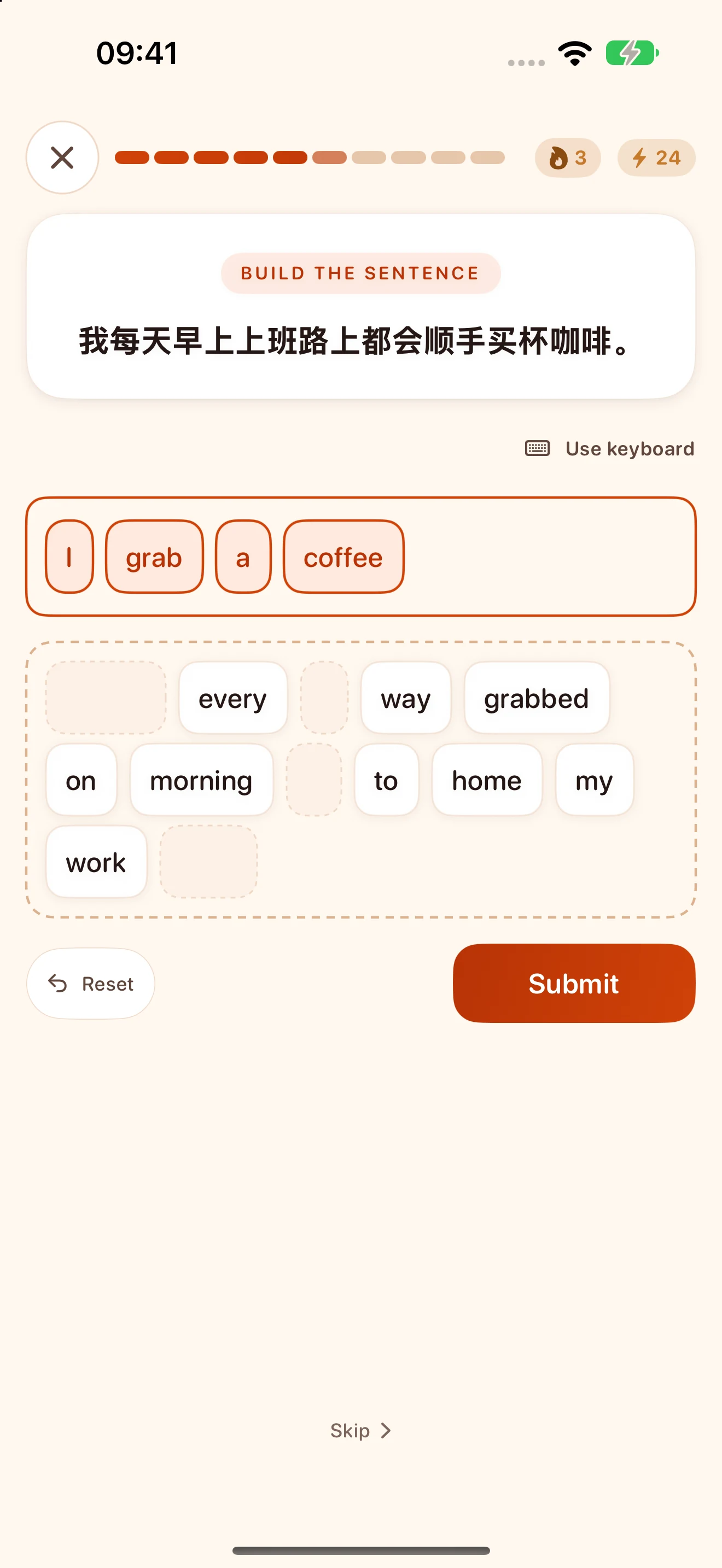
Ordering, writing and dictation that hold up

Reading

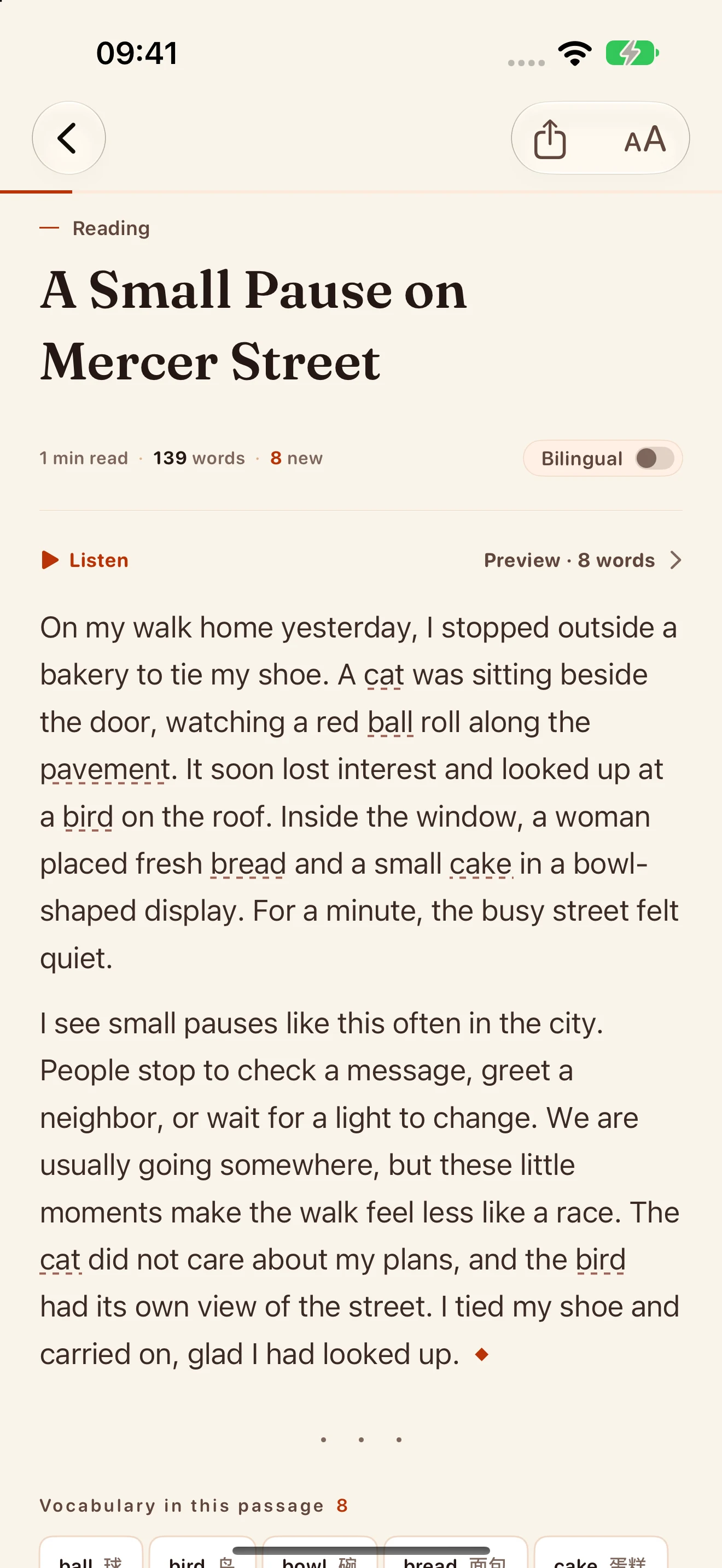
Import or generate articles, listen as you read

Shadow

Star feedback; unclear audio gets a retry

Talk

Target words enter the chat and get checked off

Import → practice

Whatever you met today becomes a full practice path

Paste a tweet, snap a batch of menu photos, record a meeting. AI pulls the words, builds a reading, prepares shadowing, then carries the same set into AI Talk.

Stop drilling generic textbook words. Practice the expression you missed today, could not say smoothly, and may need again tomorrow.

Paste an X tweet URL
Snap several menu or handout photos OCR
Record a meeting or podcast clip STT
↓
The same words enter Reading · Shadow · AI Talk
AI Talk

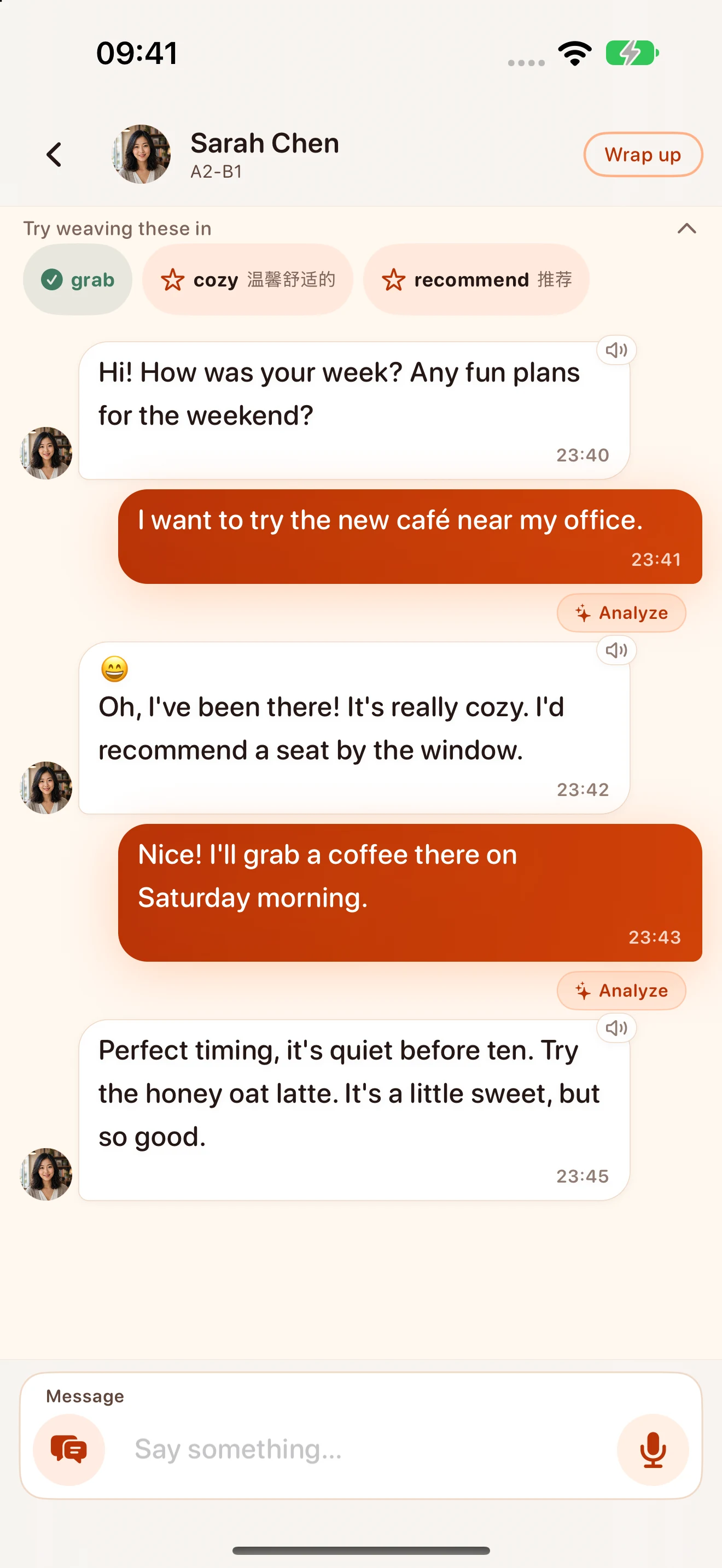
AI Talk carries today’s words into a real conversation

Before the chat, HiWord picks the words you most need to say out loud. When you use one, it gets marked, and the character keeps the topic moving naturally.

The recap is more than a score: key phrases, sentence rewrites and next steps sit on one card, and useful phrases can be saved back to your deck.

HiWord AI Talk: practice English in everyday conversations
Shadow Scoring

Speaking feedback moved from score pressure to “what to try next”

Speaking results use friendly star ratings while keeping useful signals for accuracy, rhythm, stress, fluency and clarity.

If HiWord cannot clearly hear your voice, it shows a neutral retry state instead of treating one bad recording as poor pronunciation.

★★★★☆
"I finally said it out loud."
AccuracySolid
RhythmFast
StressClear
FluencyRetry
ClarityGood
Wordbooks for your goals

From Core 850 to IELTS, business and real interests

Choose core vocabulary, everyday expressions, business English, KET, PET, IELTS, Gaokao, CET-4, CET-6, PSLE or interest-based wordbooks. Start at your level and save new words you encounter.

Daily
Core 850
KET
PET
IELTS
Business
Crypto
World Cup / F1
Inside the app

An English app built around real use

One job per screen: what to learn today, which article to read, which line to shadow, which target word to say next.

HiWord Today: daily learning path and your own English materials
Today
Start with one small step today
HiWord Practice: build an English sentence with word tiles
Practice
Build a sentence
HiWord Shadowing: read a sentence aloud and see pronunciation feedback
Shadow
See what to improve
HiWord AI Talk: practice English in everyday conversations
Talk
Target words get checked off
HiWord Reading: an article with audio and vocabulary
Reading
Meet your words in context
Optimized for iPhone Duo

Unfold. Keep reading.

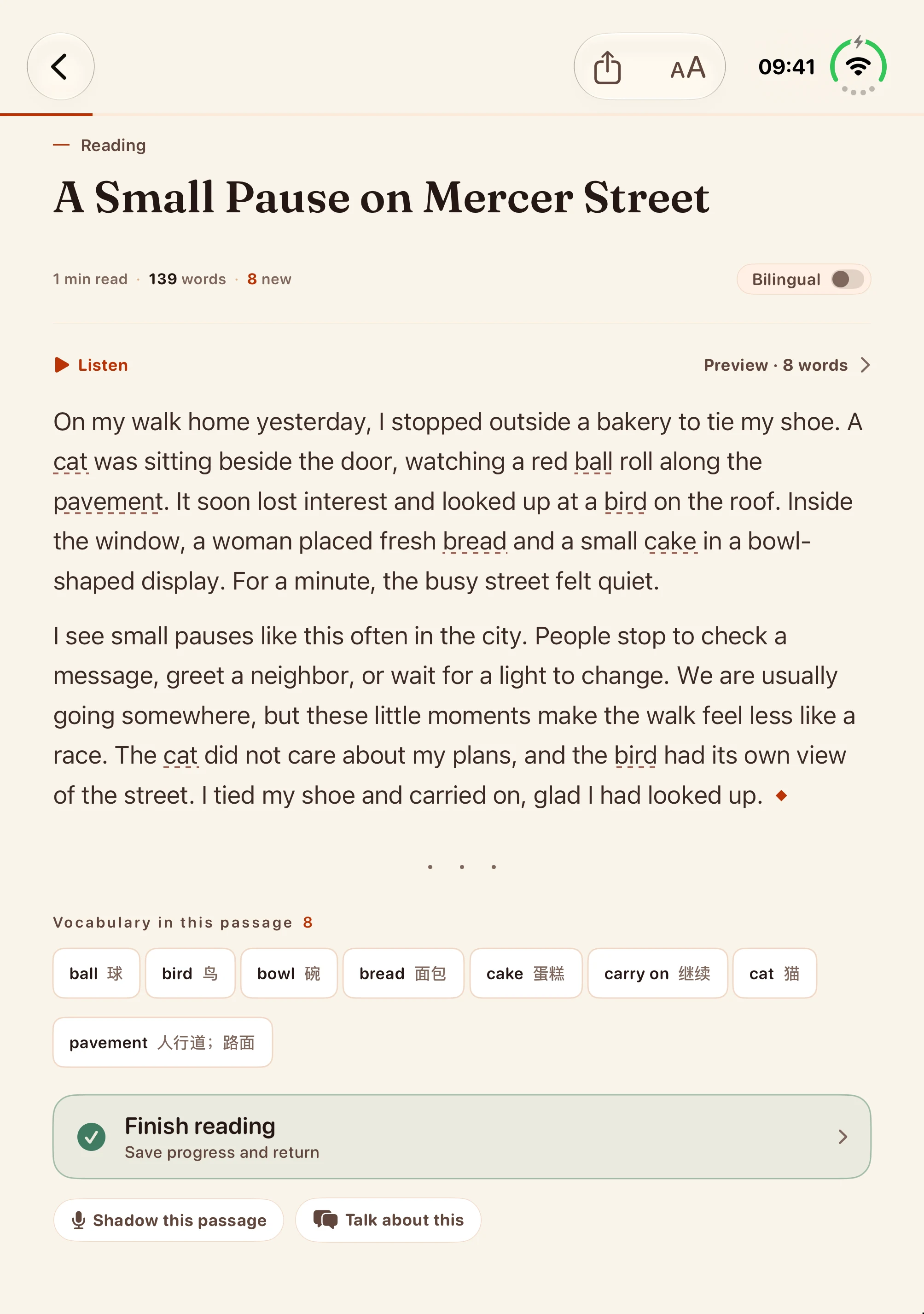
Study on the outer display, then unfold for a longer read. HiWord adapts reading, word cards and conversations to the available width.

More room to read
HiWord uses the full inner display while keeping articles at a comfortable line length, with vocabulary and practice links in view.
Keep your place
Reading keeps your place when you fold or unfold, so you can carry on with the same passage.
Stay with the conversation
When you’re viewing the latest messages, AI Talk stays at the end of the conversation as the screen size changes.
HiWord Reading on the iPhone Duo inner display: article, vocabulary and practice links
iPhone Duo inner display · Example app screen
Three surfaces, one workflow

See it on the desktop today, say it on the train tonight

Chrome extension, iOS, Web — not three apps, three doors into the same loop. See, save, read, shadow, talk.

Daytime · at work PC browser

Chrome Extension

Grab the English you see in the browser — without breaking your flow.

  • Double-click on Medium / X / GitHub / Gmail — definition pops up
  • Find a hard sentence? Send it straight into today’s Reading
  • Saved words sync to your account so you can continue reviewing on iPhone.
Commute · in pockets iOS App

iOS App

The words you saved this morning — one loop by the next stop.

  • Flip cards on the words you just grabbed — haptics make it feel physical
  • Shadow the article you imported — star feedback shows what to try next
  • Use today’s target words live with Sarah, Mike or Emma
Home · deep practice Web App

Web App

Big screen, real keyboard — open a browser, start practicing.

  • Reading audio has sentence highlights, follow-scroll, tap-to-play and speed control
  • Practice covers ordering, sentence writing and dictation — a keyboard helps
  • No install needed — open the browser and you’re in

One account, one SRS queue, one mastery state across all three. A word saved in the browser follows you into iPhone Reading, Shadow and AI Talk.

All three, your call

The latest iOS version is already on the App Store

Choose vocabulary review, reading, shadowing and AI conversation practice. Downloaded wordbooks work offline; AI features require an internet connection.

iOS App

An iPhone and iPad app with iPhone Duo layouts, daily vocabulary, speaking feedback, saved AI Talk phrases and offline wordbooks.

Get on the App Store iOS 18+ · Free download, in-app purchases

Android

The Android browser version already supports the full learning path: open the Web App, sign in with the same account, and add it to your home screen.

Open Web App Android Chrome · Add to home screen

Chrome Extension

See a word on any page? Double-click to look it up; send articles, tweets and links into Reading.

Add to Chrome Chrome / Edge / Brave
If HiWord helps

Support HiWord’s ongoing development.

Voluntary support helps cover model calls, servers and learning content as we improve reading, pronunciation practice and AI conversations.

  • Keep basic learning accessible
  • No ads or pressure-driven streak loops
  • Support goes into model calls, servers, and learning content
Still on the fence?

A few things people ask about HiWord

How can I learn English with HiWord?
HiWord brings vocabulary review, practice, reading, shadowing and AI conversation together, and supports your own materials. Read for meaning, then shadow or describe what you learned to start using familiar words in your own speech.
Is HiWord free? Does it offer a subscription?
HiWord is free to download, with free vocabulary review and basic practice. An optional, auto-renewing HiWord Pro subscription is available. See the app for current pricing and benefits.
Can I use HiWord with a small vocabulary?
Start with a suitable wordbook, such as core vocabulary, everyday expressions or KET, then add reading and speaking practice. An optional placement exercise can help you choose a starting point.
How much time should I spend each day?
Start with about 10 minutes for a small set of words, practice and reading, then add shadowing or an AI conversation if useful. Adjust the time to your materials and pace.
What if I use Android or don’t have an iPhone?
Use the web app directly and add it to your home screen in a supported Android browser. Sign in with the same account to sync supported learning data. The Chrome extension works in compatible desktop browsers.
Can I learn offline and sync my progress?
Downloaded wordbooks and some saved content are available offline. AI conversations, new content generation and cloud sync require an internet connection. Offline audio playback depends on what has been cached. Sign in with the same account to sync supported progress and saved words.

Stop studying.

Turn today’s English into something you can say tonight.

Start free · Optional Pro · No ads